How an Agent Works: Architecture on Top of an LLM
Plenty has been written about the transformer architecture, so I will describe how an LLM works from an applied point of view.
Context
An LLM takes a block of text as input; that block is called the context. Its size is capped: when all of this started, 32K was a breakthrough, and today 1M is the industry standard.
From that text the LLM generates a continuation. Modern models produce a logically complete fragment (inside the model it ends with a special <stop> token).
The context grows that way: you append the new fragment to it, and the whole thing repeats.
Calling Tools
The model is trained to use a special format for calling external functions. It differs between models. All the examples below are in Anthropic's format.
For the model to know which tools it has, they must be declared up front, that is, added at the start of the context. That part is called the "system prompt", but it is no different from the rest of the context, except that the model inserts a special separator token and is trained not to disclose what came before it.
There is a standard for describing tools - JSON Schema. In the raw prompt it looks roughly like this:
Here are the functions available in JSONSchema format:
<functions>
<function>
{
  "name": "get_delivery_status",
  "description": "Returns the current delivery status of an order by its id. Use it when the user asks where a parcel is, when it will arrive, or what is happening with it.",
  "input_schema": {
    "type": "object",
    "properties": {
      "order_id": {
        "type": "string",
        "description": "Order id, for example "RU-9948"."
      },
      "detailed": {
        "type": "boolean",
        "description": "If true, return the full movement history rather than the current status only. Defaults to false.",
        "default": false
      }
    },
    "required": ["order_id"]
  }
}
</function>
</functions>
It is really the tool's documentation in plain language, and it has to carry everything needed to call it.
With those descriptions in context, the model can generate calls. They look like this:
<function_calls>
<invoke name="get_delivery_status">
<parameter name="order_id">RU-9948</parameter>
<parameter name="detailed">true</parameter>
</invoke>
</function_calls>
Harness and MCP
The set of tools available to the model is now commonly called the harness.
For describing and calling tools that are not built into the agent itself there is an industry standard - MCP (Model Context Protocol). It effectively describes IPC (inter-process communication) between the agent and third-party systems. Both cases exchange JSON-RPC 2.0; only the transport differs: stdin/stdout of a local server process (old-timers may still remember FastCGI) or HTTP for external servers.
What the API Returns
The LLM provider's API generally returns typed JSON objects rather than raw text.
There is no single official standard (an ISO one, say) for this yet: every major provider has its own format. The most widespread is the OpenAI Tools API, reproduced by open-source engines such as Ollama and vLLM. Anthropic has a format of its own, and the examples below use it.
A Messages API response looks like this:
{
  "id": "msg_01Aq9w8gH3Nn4kLpZ2vXyR7t",
  "type": "message",
  "role": "assistant",
  "model": "claude-sonnet-4-5",
  "content": [
    {
      "type": "text",
      "text": "Let me check where your parcel is."
    },
    {
      "type": "tool_use",
      "id": "toolu_01D7FLrfh4GYq7yT2xKm9WcB",
      "name": "get_delivery_status",
      "input": {
        "order_id": "RU-9948",
        "detailed": true
      }
    }
  ],
  "stop_reason": "tool_use"
}
The tool call arrives as a separate block in the content array: it has an id, a name, and input - an object already parsed, not a string of JSON (in the OpenAI format the arguments come as a string and you parse it yourself). The sign that the turn is not over is stop_reason with the value tool_use.
The result of running the tool comes back as a new message with the user role and a tool_result block that points at the call's id:
{
  "role": "user",
  "content": [
    {
      "type": "tool_result",
      "tool_use_id": "toolu_01D7FLrfh4GYq7yT2xKm9WcB",
      "content": "Order RU-9948: in transit, Moscow-Vnukovo depot, expected delivery September 16."
    }
  ]
}
An Error Is Feedback
The tool_result block has an is_error flag. It is set when the tool failed: the command returned a non-zero code, the file was not found, the test did not pass.
{
  "role": "user",
  "content": [
    {
      "type": "tool_result",
      "tool_use_id": "toolu_01D7FLrfh4GYq7yT2xKm9WcB",
      "is_error": true,
      "content": "Traceback (most recent call last):\n  File "app.py", line 14, in <module>\n    math.sqrt(x)\nNameError: name 'math' is not defined"
    }
  ]
}
As far as the loop is concerned, nothing special happens: an error is a result of the call just as a success is. The loop does not break, the agent takes the next turn, it simply knows now that the import is missing and this time it will add the line.
This is where the feedback loop closes. Before tools, the model wrote code blind: it generated something and you dealt with the rest. Now it sees what it did and fixes it on the next turn. A text generator never had that option.
The Agent Loop
Putting it all together:
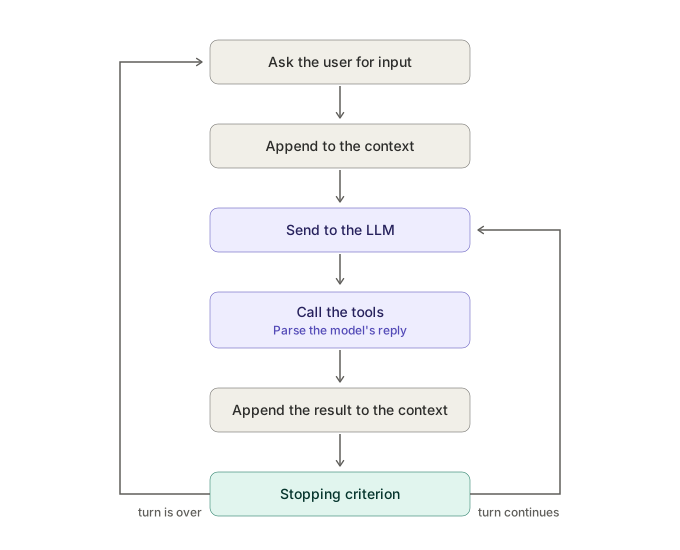
Modern models can report that the turn is over on their own, but in practice the sign is the same: there are no more tool calls in the reply.
Managing Context
The context is finite, and sooner or later it runs out. Two limits matter here. The formal one is what the model's specification states: exceed it and the API simply returns an error. The working one is the volume at which the model still holds its quality. The second is noticeably smaller than the first: in a long context the beginning and the end stay in focus, while whatever ended up in the middle starts falling out.
There are a few techniques for dealing with this.
Spilling to Files
Tool calls can return thousands of lines of text. To keep that from burning the context, only a small part of the output goes in (10-20 lines of a file, the tail of a log), and the rest is written to a temporary file whose path goes in beside it.
If the model needs the rest, it pulls it out of that file with another tool call.
Compaction
This is the approach where the entire context is replaced with a short summary. It is done with an LLM as well: a special system prompt is concatenated with the session history, and the resulting summary takes the place of the old context.
Here is a trimmed example of such a prompt:
Your task is to produce a detailed summary of the conversation, paying particular attention to the user's explicit requests and to your own previous actions.
The summary must carefully record the technical details, code patterns, and architectural decisions needed to carry on with the project without losing context.

The summary must include the following sections:

1. Primary request and intent: record every explicit request and intent of the user in detail.
2. Key concepts: list all the important concepts, approaches, and technologies that were discussed.
3. ...and so on
Write Your Own
That is the whole agent. I have deliberately left out subagents, memory files, and the other mechanics the basic architecture does without.
I recommend writing an agent against the raw API for practice: 200-300 lines of code will get you a tool not far behind Claude Code or Codex. An agent's strength is mostly the strength of its model, not the set of tools it has.